
A clearer way to work with event times
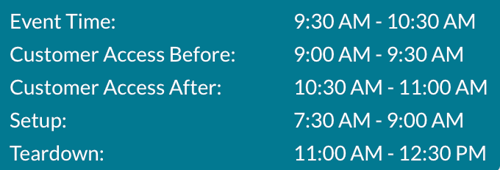
We made several updates to how times are displayed throughout Mazévo, including:
- Event start and end time
- Setup start and end time
- Teardown start and end time
- Customer access before the event
- Customer access after the event
Previously, these time blocks were there, but they weren’t always easy to read together or understand as a complete timeline. Now, each block is clearer and easier to follow so you can see how everything fits together. You’ll notice these improvements in manage Ops, Review Events, The Event Book and The Event Editor.
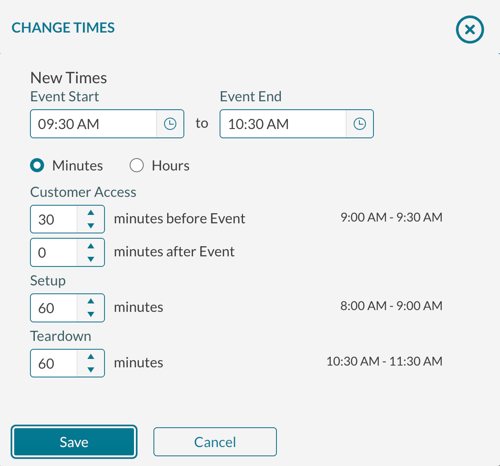
Revamped Time Editor
We also rebuilt how you add and adjust time on events. The new time editor lets you add time before or after an event using minutes or hours and see the actual start and end time update as you make changes
What this means for your team: Instead of doing mental math or checking multiple fields, you can see the impact of your changes right away.
Billing worksheet: Event Coordinator now included
The billing worksheet will now display the Event Coordinator. You could previously only filter by Event Coordinator and now you can see that information directly in the report.
Why this matters: This provides better visibility into who is resposible for each event.
Subscribe to Activity Log views
You can now subscribe to Activity Log views, similar to published reports or Find Events views. You’ll receive an email reminder with a link that takes you directly to that view.
Why this matters: This means you can more easily stay on top of important activity and reduce the chance of missing something important
Day at a Glance: quick access to Activity Logs
We added a new tile in Day at a Glance that links to your favorite Activity Log views. Previously, you had to navigate seperately into the Activity Log to get there.
Why this matters: If you spend a lot of time in Day at a Glance you now have faster access to the information you check most.
Bugs fixed
We also addressed a few issues:
- Fixed incorrect row numbers when reporting errors during course imports
- Fixed missing “first booking date” when exporting deposits and payments
- Fixed conflicts incorrectly triggered for some cross-listed courses during import