
This update includes several enhancements designed to make everyday tasks easier, improve reporting clarity, and continue strengthening accessibility across the platform.
As always, many of these improvements come directly from customer feedback. Some are small refinements that save clicks. Others solve long-standing friction points. All of them are focused on helping you work more efficiently.
Adding Resources: Filter by Resource Grouping
When adding resources through the Event Editor, you can now filter by resource grouping.
If you use resource groupings, you know how helpful they are for organizing equipment, catering items, or services. Until now, however, there was no way to limit the resource list to just the grouping you were looking for. You had to scroll through everything.
Now you can quickly filter to the exact grouping you need, making the process faster and more focused.
Advanced Find Events: Automatic Totals When Grouping
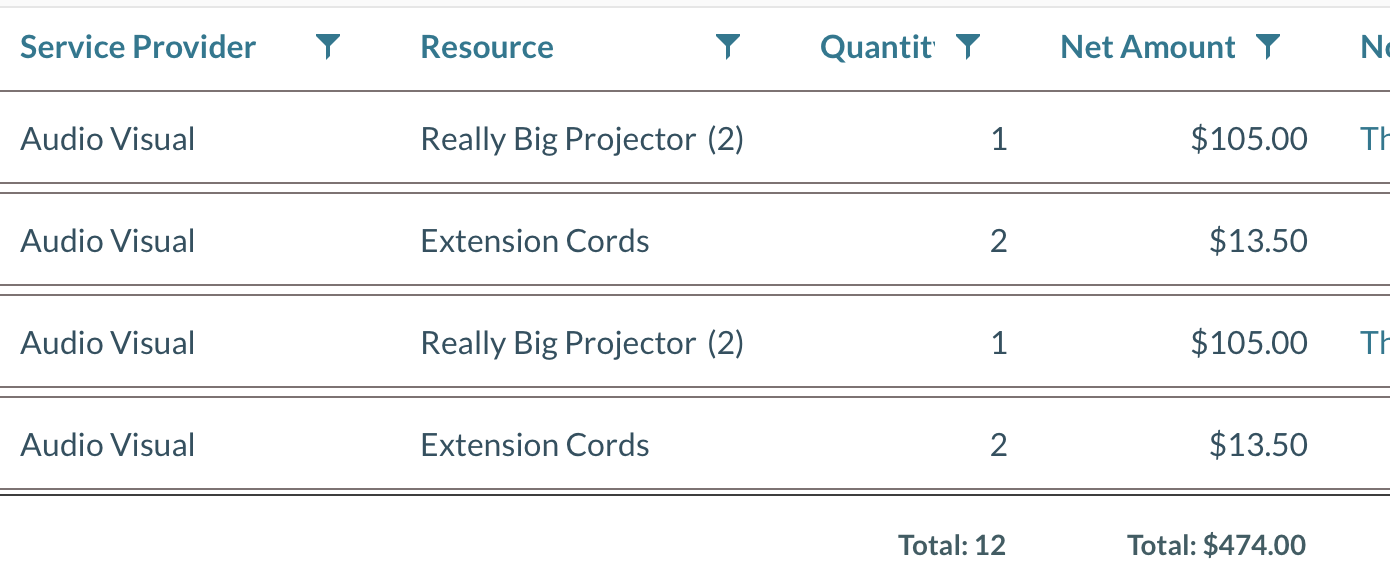
When grouping results by a column in Advanced Find Events, Mazévo will now display totals at the bottom for quantity and amount columns.
Previously, if you wanted totals, you had to export to Excel and manually add them up. Now the totals are calculated for you directly within the report.
This small enhancement makes Advanced Find Events even more powerful for quick financial and usage analysis.
Resource Selections: Drag and Drop Ordering
When defining a resource selection, you can now reorder:
- Resource selection groupings (Entrée, Salad, Dessert)
- Individual selection items
Simply click and drag them into the desired order.
Previously, if the order was incorrect, you had to delete items and re-enter them in the correct sequence. This update makes maintaining clean, well-organized selections much easier.
Event Type Can Now Be Required for Event Planners
You can now require Event Type when event planners are entering a new event.
Previously, this requirement could only be enforced for requesters. Now you have greater consistency and control over your data, ensuring event types are captured regardless of how the event is created.
Search for Bookings with a Blank Event Type
You can now search for bookings where the Event Type field is blank.
Before this update, the search tool could only find records that had a value in the Event Type field. This enhancement makes it much easier to identify and clean up incomplete data.
Change the Owner of a Saved Filter
Global Administrators can now change the owner of a saved filter in Find Events.
Previously, there was no way to transfer ownership. This improvement is especially helpful when staff roles change or when saved filters need to be shared or maintained by a different team member.
Event Book Cursor Placement
This one is small, but it will make some people very happy.
When opening the Event Book, Mazévo will now place the cursor in the Building field instead of the search field.
For those who use the Event Book frequently, this saves a click every time.
Small refinements add up.
Daily Operations Report Sorting Improved
The Daily Operations Report by Booking Format has been updated.
The report will now sort by:
- Date
- Event Time
Previously, it sorted by date and then by Booking ID. This new sorting order makes the report easier to read and more aligned with how most teams review daily activity.
Accessibility Improvements
We have made additional behind-the-scenes improvements to enhance accessibility and better align with WCAG guidelines.
Accessibility is not a one-time milestone. It is an ongoing commitment. We continue to review, test, and improve the Mazévo experience to ensure it works well for all users.
Bugs Fixed
We also addressed the following issues:
- Long event notes were being cut off on mobile devices, preventing users from viewing and editing full text.
- The new user tile in Day At A Glance was not displaying accurate results.
- Editing a consolidated event list was incorrectly setting the date range.
- Users were not being prevented from exceeding the maximum number of resource selections.
- The list of approvers for secondary approvals was not updating accurately when users became inactive.
- Searching by room tags in the Event Book could cause the screen to malfunction in some cases.
If you have questions about any of these updates or want help exploring how they might improve your workflow, please reach out to our team.
Thank you for continuing to shape the future of Mazévo with your feedback.