
This release adds several quality-of-life improvements that make it easier to manage daily scheduling, approvals, and communication in Mazévo. You’ll also find new options for filtering, exporting, and visualizing your work, plus a handful of important bug fixes.
Redesigned Day at a Glance
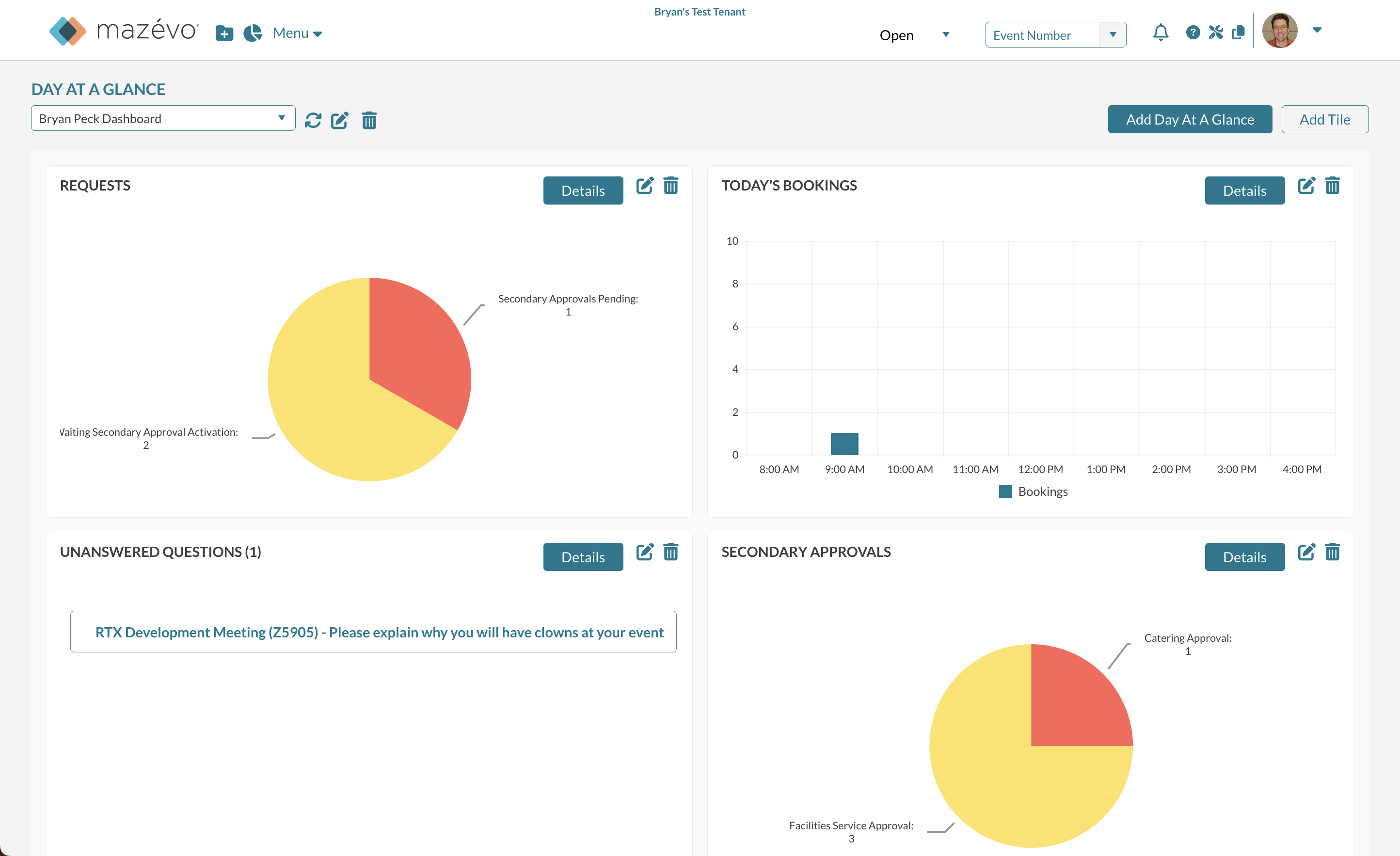
The Day at a Glance view has been completely redesigned to offer a more visual and customizable experience. Instead of switching between lists hidden behind a menu, planners now see an at-a-glance dashboard with configurable charts for the tools they care about most.
Each chart provides instant insight—such as requests by approval status or bookings by hour—and can be clicked to view the familiar event lists. Users can tailor charts to specific buildings or booking statuses and even create multiple dashboards to monitor different locations or responsibilities.
This update makes it faster and easier to understand what’s happening today, spot issues that need attention, and stay on top of daily scheduling activity.
Check out our two-minute overview video of how it works.
Choose the Date Range When Viewing Tasks
When viewing your tasks from Day at a Glance, you can now set the time window for which tasks appear. By default, Mazévo shows tasks due from the past 60 days through 7 days in the future, but you can adjust this window to match your needs.
Why it matters:
Whether you like to review older overdue tasks or focus only on what’s due this week, this new filter gives you full control over how you manage your to-do list.
Assign Tasks to Event Coordinators Automatically
You can now have Mazévo automatically assign tasks to an event’s designated Event Coordinator.
Why it matters:
This saves time and ensures the right people are always notified when new work is created. Instead of manually reassigning each task, event coordinators will now automatically receive the tasks related to their events, helping everyone stay organized and accountable.
Filter Secondary Approvals by Building
You can now use Building or Room Tag as a filter when determining when a secondary approval is triggered.
Why it matters:
This gives you finer control over your approval workflows. For example, you might only require specific approvals for events in certain buildings or facilities. This makes your approval rules more precise and reduces unnecessary notifications.
View Booking Counts for Organizations and Contacts
When viewing current or past events for an organization or contact, Mazévo now displays a count of bookings at the top of the grid.
Resource Images Now Display in the Event Editor
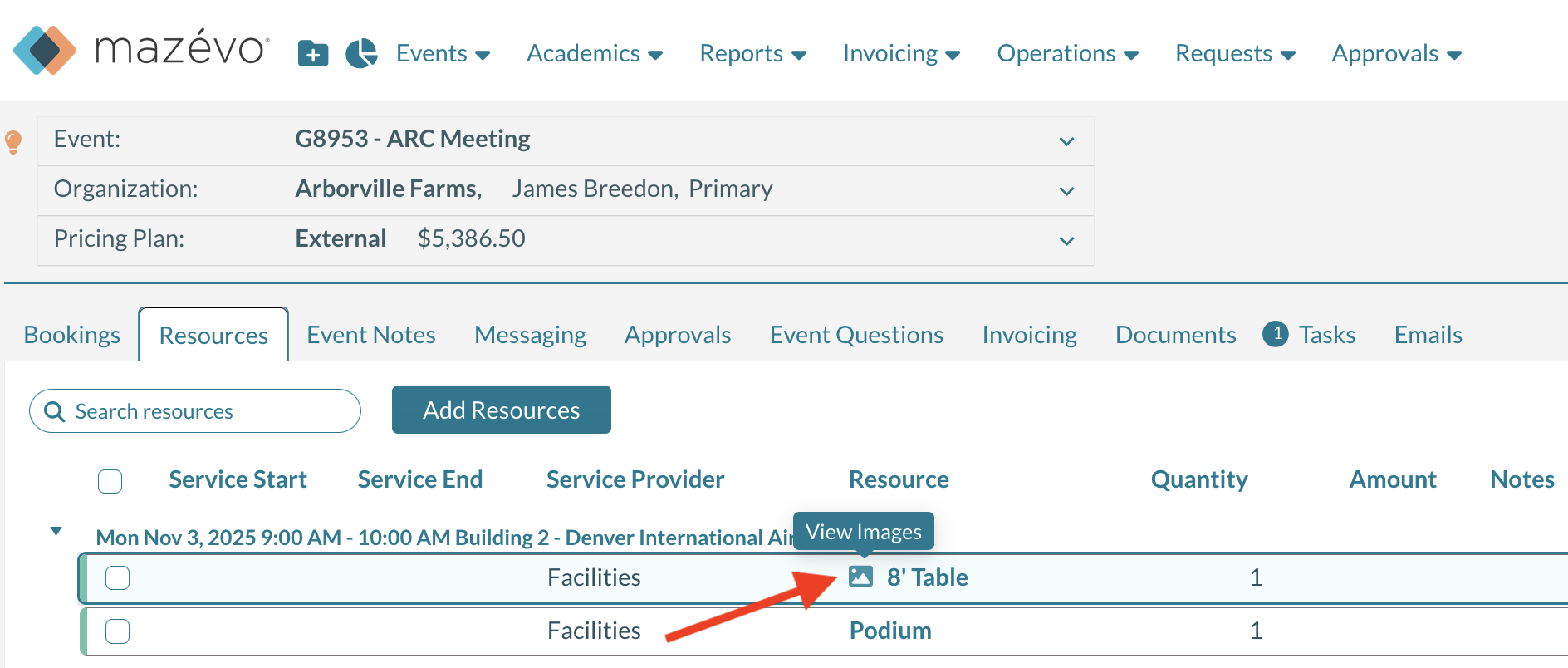
You can now view resource images directly in the event editor—anywhere you see a list of resources.
Why it matters:
Visual references help planners confirm they’ve selected the correct resource, such as a piece of equipment, without having to navigate away from the event.
Requesters Can Now See “Other” Statuses More Easily
Bookings with a request behavior of “Other” now automatically appear in the requester’s My Events view.
Why it matters:
Previously, these bookings were hidden unless the requester selected Show Canceled Bookings. Now, requesters always have full visibility into their requests without needing to change settings.
Add Identically Named Resources to Different Providers
Mazévo now allows multiple resources with identical names when they belong to different service providers.
Why it matters:
If your organization has multiple providers offering the same type of service (e.g., “Projector” from AV Services and “Projector” from IT), you can now manage them independently while keeping names clear and consistent for users.
Export the Academic Book to PDF
The Academic Book can now be exported directly to PDF.
Why it matters:
This provides a clean, shareable format for academic scheduling reports, eliminating the need to rely on browser print functions. You can easily share or archive the book as a properly formatted document.
Time of Day Filter Now Includes Reserved and Event Time
When using Advanced Find Events, you can now choose whether to filter by Reserved Time or Event Time. Previously, the filter was only for reserved time.
Why it matters:
This flexibility helps schedulers find exactly what they’re looking for. For example, you might want to locate events that occur at a specific time rather than those that reserve space during that time window.
Check Availability by Room Tag
The Check Availability for Courses tool now supports Room Tags as a filter.
Why it matters:
This makes it easier to quickly find available rooms that may be located in multiple buildings or that have similar attributes.
Operations Work Log Report Now Shows When a Work Item Was Created
The Work Log report now records the timestamp of when each work item was created.
Why it matters:
This provides a more comprehensive history of what happened and when, making it easier to audit or review activity on a specific date.
Room Name Display Improved in Copy Booking Tool
In the Copy Booking Tool, the room field now displays Room Name followed by Building.
Why it matters:
This small but meaningful change allows you to see room names at a glance without text being cut off in dropdown lists.
Bug Fixes
We also cleaned up several issues to make your experience smoother and more reliable:
- The Event List Report now correctly displays rooms in alphabetical order when multiple rooms are booked.
- Fixed an issue where Event Questions sometimes failed to save responses.
- SSO now applies appropriate security policies in all cases.
- Building hours now display correctly in the event book for requesters when a single building is selected.
- Fixed an issue with the special date search option not functioning in some cases.
- Fixed a problem preventing users from adding an academic room code to a room.
- Corrected an issue where new bookings weren’t updating the created/modified date in Day at a Glance.