
This release makes common tools easier to find, reduces repetitive work, and improves navigation for teams working on an iPad. Most of the features in this release came directly from customer feedback.
Tasks and approvals
Add organization tasks more easily
What Changed
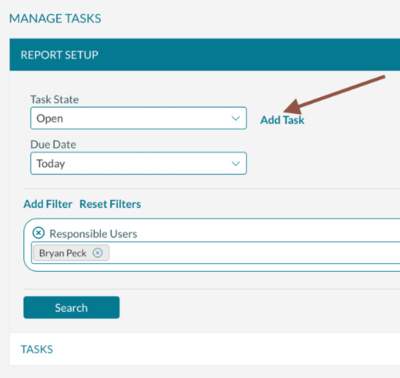
Manage Tasks now includes an Add Task button on the first screen. Previously, you had to search for all tasks before the option appeared.
Why It Matters
The option to add a task is now easier to find. This helps your team create organization tasks with fewer steps.
View resource counts during secondary approval
What Changed
Secondary approvers can now see an event’s resource count when they open the event. This matches the information available in the event editor.
Why It Matters
Approvers have better visibility into the scope of an event without moving between tools. This supports faster, more informed approval decisions.
Publish all approved calendar details at once
What Changed
Calendar managers can now select Publish All when approving calendar details submitted by a requester. Previously, each detail had to be approved individually.
Why It Matters
This saves time when a request includes several calendar details and reduces repetitive steps during the approval process.
Academics
Copy course features between terms
What Changed
The Academic Optimizer can now copy course features from one term to another. Courses are matched using:
- Subject
- Section
- Days of the week
Previously, course features had to be added again for each new term.
Why It Matters
Academic scheduling teams can prepare new terms more quickly while maintaining consistent course requirements.
Open the academic availability checker sooner
What Changed
The academic availability checker is now available from the academic book. An additional link has also been added beside the Terms dropdown in Find Courses.
Previously, you had to run a search in Find Courses before the availability checker link appeared.
Why It Matters
Schedulers can check availability sooner and from more places, making it easier to identify options while working with courses.
Configuration and communication
Find parent questions more quickly
What Changed
When configuring a dependent event question, you can now search for the parent question.
Why It Matters
This makes dependent questions easier to configure, especially when your organization uses a large number of event questions.
Search event messages
What Changed
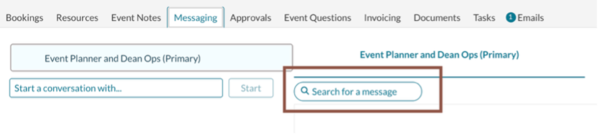
Event planners can now search for messages containing specific text from the event editor’s Messaging tab.
Why It Matters
Teams can locate important conversations more quickly without reviewing every message in an event.
Operations
Navigate Manage Operations more easily
What Changed
The Manage Operations page has been updated to improve viewing and navigation, especially when using an iPad.
Why It Matters
Operations teams can review booking information with less scrolling and move through the page more efficiently on smaller screens.
Simplify the Manage Operations grid
What Changed
The Last Hours and Next Hours columns are no longer displayed by default in Manage Operations. Organizations that still need these columns can contact Mazévo Support to have them re-enabled.
Why It Matters
Removing less frequently used columns creates more room for essential booking information and reduces horizontal scrolling.
Access booking status icons with less scrolling
What Changed
The Change and Setup Ready icons have moved to the left side of the Bookings grid. The Head Count column has moved to the far right.

Why It Matters
iPad users can see important status information sooner, with less horizontal scrolling.