
This release includes several enhancements designed to improve visibility and reduce unnecessary administrative work. Many of the improvements in this release came directly from customer suggestions. Thank you for the feedback you continue to share with us!
Event Management
Monitor Expiring Certificates Directly from Day at a Glance
What Changed
Organizations often have files and certificates, such as insurance certificates, attached to their records. You can now add a Day at a Glance tile that displays certificates that have expired or are approaching expiration.
Previously, users had to navigate to Organizations and select Manage Certificates to review expiring certificates.
Why It Matters
This improves visibility and makes it easier to stay ahead of certificate renewals. Staff can monitor expiring documents as part of their daily workflow without needing to navigate to a separate area of the system.
Search for Events Created by a Specific User
What Changed
Advanced Find Events now allows you to search for events based on the user who created them. Previously, there was no way to generate a list of events entered by a particular user.
Why It Matters
This provides additional reporting and auditing capabilities. It can be useful for training, workload reviews, troubleshooting, or identifying records created by a specific team member.
Save Find Events Views with a Fixed Date Range
What Changed
When saving a view in Find Events, you can now define a specific fixed date range. Previously, saved views always defaulted to using the current date as the starting point when they were run.
Why It Matters
This makes recurring reporting easier when you frequently refer to the same historical or future time period. It reduces the need to adjust dates each time a report is run.
See Event Coordinators Directly from the Event Book
What Changed
The Event Book tooltip now displays the assigned event coordinator when one has been defined. Previously, users needed to open the event record to see this information.
Why It Matters
This improves visibility for scheduling and event services teams and makes it easier to identify event ownership without leaving the Event Book.
Improve Room Selection When Moving Bookings
What Changed
When moving a booking that is in a status that does not hold space, you can now choose to display only rooms that are actually available. Previously, all rooms appeared available because the booking being moved was not reserving space.
Why It Matters
This makes room reassignment more accurate and reduces the chance of selecting an unavailable room.
Services
Limit Service Change Notifications to Recent Changes
What Changed
Service providers can now specify the timeframe for booking changes they care about when sending service change notifications.
For example, a service provider can choose to receive notifications about changes to events scheduled in the next 14 days rather than bookings far out in the future.
Why It Matters
This gives service providers more control over the information they receive and helps focus attention on recent updates that require action.
Send Service Notifications Only for Approved Bookings
What Changed
Mazévo will now send service change notifications only for bookings that are not in a Pending status. Previously, service providers would receive notifications about bookings that had not yet been approved.
Why It Matters
This significantly reduces unnecessary emails and helps service teams focus on bookings that are moving forward and are more likely to require work.
Imports
Import Customer Access Time with Booking Imports
What Changed
You can now include customer access time before and after an event when importing bookings from Excel or text files. Previously, customer access time could not be specified during the import process.
Why It Matters
This reduces manual updates after an import and helps ensure bookings accurately reflect setup, access, and breakdown requirements from the start.
Review Recent Imports More Easily
What Changed
The Import Bookings view is now sorted by import date by default rather than import description.
Why It Matters
This makes it easier to locate and review recent imports without additional sorting.
Hide Older Academic Terms by Default
What Changed
The Terms list will now automatically hide terms that are more than 90 days in the past.
Why It Matters
This keeps the list focused on current and upcoming terms while still allowing access to historical records when needed.
Advanced Academics
Optimize Newly Added Courses Without Re-Optimizing an Entire Subject
What Changed
Course optimization and room assignment often happen over several days. If additional courses are added after a subject has already been optimized, you can now optimize only those newly added courses. Previously, your options were to either manually assign rooms or re-optimize the entire subject.
Why It Matters
This gives academic schedulers more flexibility when working through ongoing scheduling cycles. It reduces manual room assignment work and helps maintain existing optimization decisions while accommodating changes and additions from your SIS.
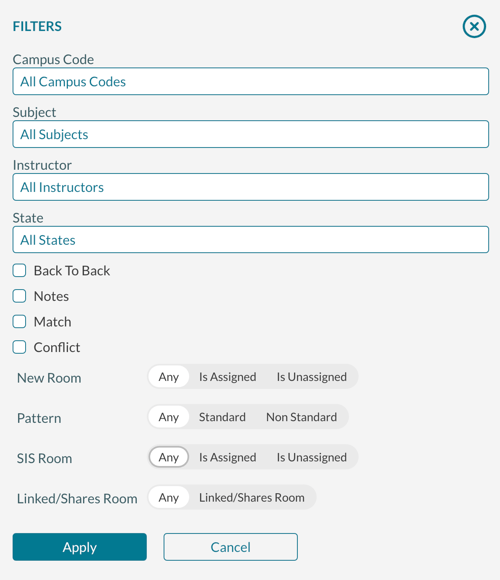
Filter Optimizer Results with Greater Precision
What Changed
Several new optimizer filters have been added, making it easier to narrow down courses and scheduling scenarios. You can now filter by:
- Subject
- State (optimized, excluded, etc.)
- Instructor
- Courses that are linked or share a room
- Blank campus codes
Previously, some of these searches required using the search bar, making it difficult to combine multiple criteria at once.
Why It Matters
Academic schedulers can now quickly focus on the exact courses they need to review. This is especially helpful when working with large course inventories and complex room assignment projects where multiple criteria need to be evaluated at the same time.
Identify Instructors with Back-to-Back Final Exams
What Changed
You can now filter the final exam list to identify instructors with back-to-back final exams.
Why It Matters
This provides better visibility into potential scheduling concerns and makes it easier to evaluate exam schedules before they are finalized.
Receive Notifications When SIS Room Updates Fail
What Changed
If a room assignment is updated in Mazévo but cannot be successfully updated in your SIS, Mazévo will now notify you of the error.
Why It Matters
This helps prevent room assignment discrepancies between systems and allows schedulers to address issues before they create confusion for faculty, students, or administrative staff.
Bug Fixes
Event Management
- Locked bookings can no longer be canceled by requesters.
- Copying a saved Find Events view now correctly includes attendance filters.
- Disabled room setups no longer appear as selectable options for requesters.
Approvals & Notifications
- Fixed issues that could affect secondary approval emails.
- Invoice emails now correctly display the invoice number in the subject line.
Administration
- Removing the email logo in Account Settings now saves correctly.