
Better visibility for organizational alerts
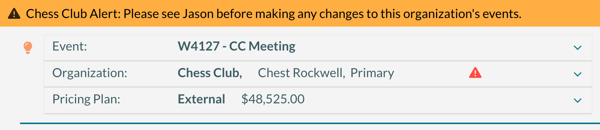
Organizational alerts are now much more visible in the Event Editor. A caution icon appears next to the organization, and a banner displays across the top of the page with the alert message.
Why it matters
Important context should not be easy to overlook. This makes alerts visible right away so your team can catch issues early.
Secondary approvals by organization
You can now trigger a secondary approval based on the organization tied to an event.
Why it matters
Some organizations need additional oversight. This helps you route requests to the right people without adding manual steps.
Room cards for rooms with no bookings
You can now print room cards for rooms that have no scheduled events. If a room has no bookings, the card will display “No Events.”
Why it matters
Empty rooms still need to be clearly communicated. This gives you a complete set of room cards without extra work.
Activity log: changes by user
The activity log report now includes an option to count changes by user, showing which fields were updated and how often.
Why it matters
This gives you a clearer picture of system activity, which can help with training and accountability.
Academic course booking history
You can now view the history of changes for academic course bookings.
Why it matters
You can see how a course booking has changed over time, which makes troubleshooting and verification easier.
Manage pricing: room type column
The Manage Pricing screen now includes a Room Type column for filtering and sorting.
Why it matters
If you price by room type, this makes updates faster and helps reduce errors.
Internal notes on resources
There is a new Internal Notes field on resources. This information does not appear on reports.
Why it matters
You now have a place to store internal details like storage locations or handling notes for staff.
Secondary approval exports now include approvers
Exports of secondary approvals now include the users assigned as approvers.
Why it matters
You get a complete view of your approval setup, which makes reviews and audits easier.
Bug fixes
- Fixed an issue where cross-listed courses were incorrectly shown as changed
- Fixed an issue where courses showed conflicts when none existed
- Fixed an issue where some courses were not properly represented as courses
- Fixed an issue where history was not always recorded when an event time changed
- Fixed an issue where users were notified of booking changes, but the change details screen was not updating