
This release includes several updates that make information easier to find, reduce extra steps, and create a more consistent experience across Mazévo. It also adds flexibility for administrators, approvers, academic schedulers, and operations teams.
Event management
See when resources are attached to an event
What Changed
The Resources tab in the Event Editor now displays an indicator when an event has resources. After you open the tab, Mazévo displays the total resource count. 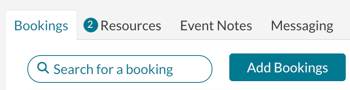 Why It Matters
This provides a clear visual cue and makes the Resources tab consistent with other tabs in the Event Editor. Your team can quickly see whether resources have been added without opening each tab.
Add new event contacts without leaving the editor
What Changed
When editing an event, you can now add a new secondary or billing contact directly from the editing screen. Previously, you had to leave the event, create the contact on another page, and then return to add the contact to the event.
Why It Matters
This reduces extra steps and helps your team keep event updates moving without interrupting its workflow.
Reports and saved views
Manage subscribers for any published report
What Changed
Global administrators can now edit the subscribed user list for any published report, even when they are not the report owner.
Manage subscribers for any saved Find Events view
What Changed
Global administrators can now edit the subscribed user list for any saved view in Find Events. Previously, administrators could only edit subscriptions for views they owned.
Find room setup style changes in the activity log
What Changed
The activity log can now be limited to changes involving the Room Setup Style field. You can also filter the report by a specific setup style. For example, you can find bookings that were changed to “See Diagram” during the past week.
Why It Matters
Operations teams can locate recent setup changes more quickly and confirm that detailed room requirements receive the appropriate follow-up.
Academics
Open the current academic term at the current week
What Changed
When you open the current term in the academic book, Mazévo now opens it at the current week instead of the first week of the term.
Why It Matters
Academic schedulers can begin working with the most relevant dates immediately, without navigating forward from the start of the term.
Display instructor names on room cards
What Changed
Room cards now show the instructor’s name in the contact name column for courses. Previously, this field was blank for courses.
Secondary approvals
Give approvers access to the full event email history
What Changed
A new secondary approval setting allows approvers to view the complete email history for an event. Previously, approvers working in My Approvals could only see emails they had sent.
Approvers can review more of the event’s communication before making a decision. This provides better context and reduces the chance of missing an important detail.
Messages and scheduled emails
Add bulleted and numbered lists to messages
What Changed
When creating or editing a message, you can now include bulleted and numbered lists in the message body.
Add bulleted and numbered lists to scheduled emails
What Changed
When creating or editing a scheduled email, you can now include bulleted and numbered lists in the email body.
Scheduling and configuration
Set a specific earliest booking date
What Changed
Room Security Groups can now use a specific date as the earliest date on which new bookings may occur. Previously, this restriction could only be defined as a number of hours before the event. For example, a security policy can now require new bookings to occur after October 1.
Why It Matters
This gives administrators more flexibility when managing booking windows for future terms, seasonal operations, and other date-based scheduling periods.
Bug fixes
Notifications
- Corrected an issue affecting email notifications that use the email address defined in a security policy.
Analytics
- Corrected the utilization percentage calculation in Analytics.
Manage Ops
- Corrected an issue that prevented bookings from appearing when the Manage Ops page initially loaded.
- Deleted resources are no longer displayed in Manage Ops Services.