
We’ve made several updates to Mazévo to give you more control over event details, improve coordination with your team, and streamline day-to-day tasks.
New Customer Access End Time
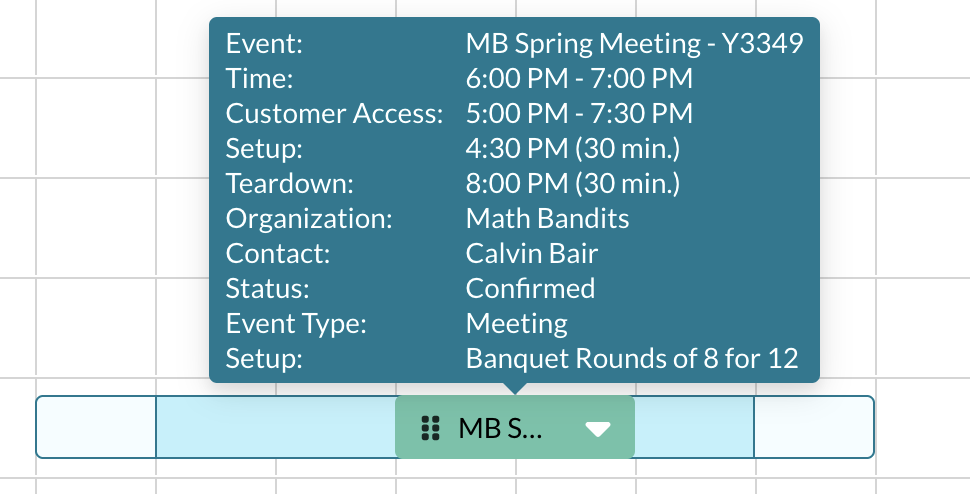
You can now specify the time that a customer has access to a room after the event ends.
Previously, you could only define access time before the event. This enhancement gives you a more complete picture of how a space is being used and helps your team better manage room turnover, cleanup, and expectations with customers.

Requesters Can Add Customer Access Time
You can now collect customer access time directly from requesters as part of the request process.
This allows requesters to indicate when they need access to a room before their event starts or after it ends. Capturing this information up front helps your operations and setup teams know exactly when the customer is expected to be in the space, reducing confusion and follow-up.
Create and Find Invoices by Event Coordinator
When creating or searching for invoices, you can now filter by event coordinator.
Mazévo will display invoices only for events assigned to the selected coordinator. This makes it easier for coordinators to review their events for billing accuracy and helps keep invoice management organized.
Suppress Resource Notes and Special Instructions from Reports
You now have the option to hide resource notes and special instructions from:
- Daily Ops Report
- Service Order Reports
- Confirmations
This gives you more control over what information appears on reports, helping you keep documents clean and relevant for their intended audience.
Change Task Due Dates from Day at a Glance
You can now edit task due dates directly from the Day at a Glance page.
Previously, this could only be done from My Tasks or within the event editor. This update allows you to manage tasks more efficiently without leaving the view many teams use throughout the day.
New Favorite Organizations
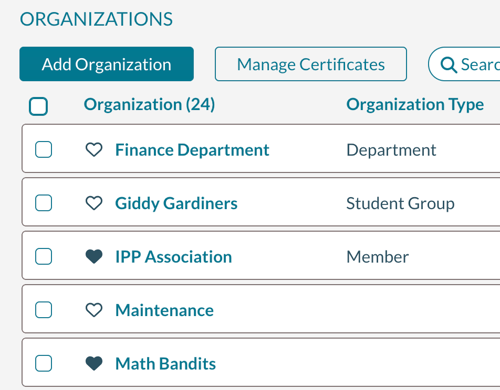
You can now mark organizations as Favorites.
Favorite organizations will appear at the top of the list when creating a new event, making it faster for event planners to select frequently used organizations and reducing repetitive searching.
Bug Fixes and Updates
- Fixed an issue where request emails were not sent when a room was booked using a QR code
- Inquiry notification emails have been temporarily removed while we address related issues