
This release focuses on making common tasks in Mazévo simpler and more focused. Administrators can complete setup work with fewer steps, service teams can narrow calendars to the events that matter to them, and several smaller updates improve everyday workflows. Most of these new Mazévo features come directly from customer feedback.
Administration and configuration
Assign organizations while setting up requester security
What Changed
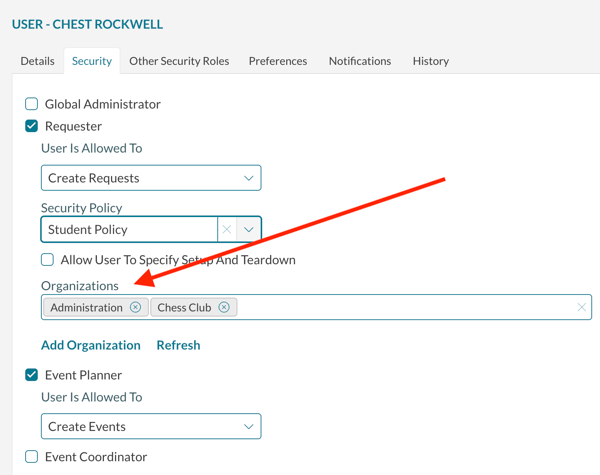
When editing a requester’s security, administrators can now specify the organizations associated with that user’s contact record.
Previously, setting up a requester required administrators to edit the security policy under the user account and then navigate to Contacts to associate the contact record with the appropriate organizations.
Why It Matters
This brings two parts of account provisioning together in one workflow. Administrators can set up requester access and organization associations with fewer steps and less navigation.
Configure resource billing and pricing from the resource page
What Changed
When adding or editing a resource, a new Billing tab lets Billing Administrators configure:
- Account Code
- Sales Tax
- Service Charge
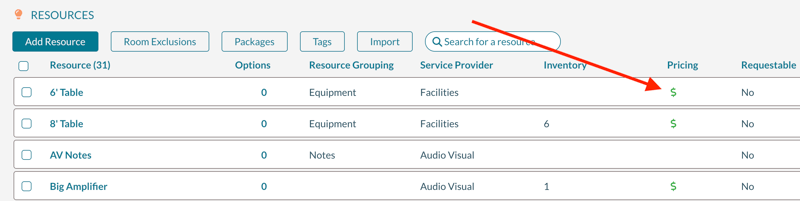
Pricing can also be edited by selecting the new pricing icon on the main resource grid.
The Billing Administrator role is required to edit these billing fields.
Why It Matters
Administrators can now handle more of the resource setup process without leaving the main resource page. Previously, billing information and pricing required navigating to separate pages.
This makes it easier to fully configure new resources while reducing the chance of overlooking an important billing or pricing setting.
Calendars
Filter public calendars by attendance and service provider
What Changed
Calendars can now be pre-filtered by:
- Event attendance
- Service providers
Service providers can use the new options to see bookings that include their selected services.
Why It Matters
Busy calendars can contain far more information than an individual service team needs. These filters help staff focus on the events relevant to their work and reduce unnecessary calendar noise.
For service providers, that means a clearer view of where their services are needed.
Everyday improvements
See quantity first on BEO confirmations
What Changed
In the BEO format of confirmations, the first two columns have been reversed. Quantity now appears before the resource description.
Why It Matters
The updated order makes BEO confirmations more consistent with other Mazévo reports and makes it easier to scan resource quantities.
Export historical approvals as a secondary approver
What Changed
Secondary approvers can now export approvals when viewing historical approvals.
Why It Matters
This gives secondary approvers an easier way to work with past approval information outside the historical approvals view. It can also help when reviewing previous decisions or maintaining approval records.